最近通过nextjs制作了一个静态工具网站 PriceCalc,依然是通过Cloudflare Pages进行部署,并且开启了Crawler Hints,也就是必应平台的IndexNow功能。大概作用就是站点内容改变后,自动推送到必应,可以更快地进行抓取和索引。
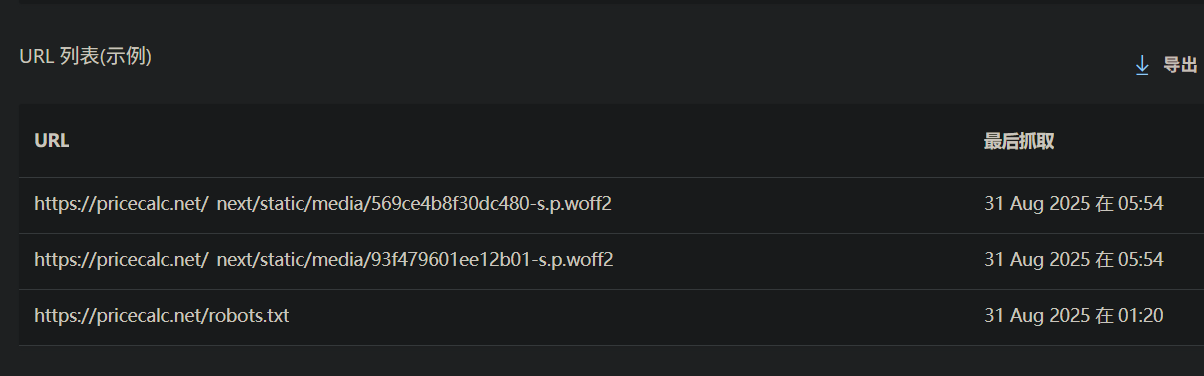
但这个功能好像对于我的网站来说是无效的,因为我打开必应后台后,发现IndexNow一直在推送一些无效的页面,比如_next/static下面的文件。这反而起了反效果,甚至这些页面有些还被收录到索引了。
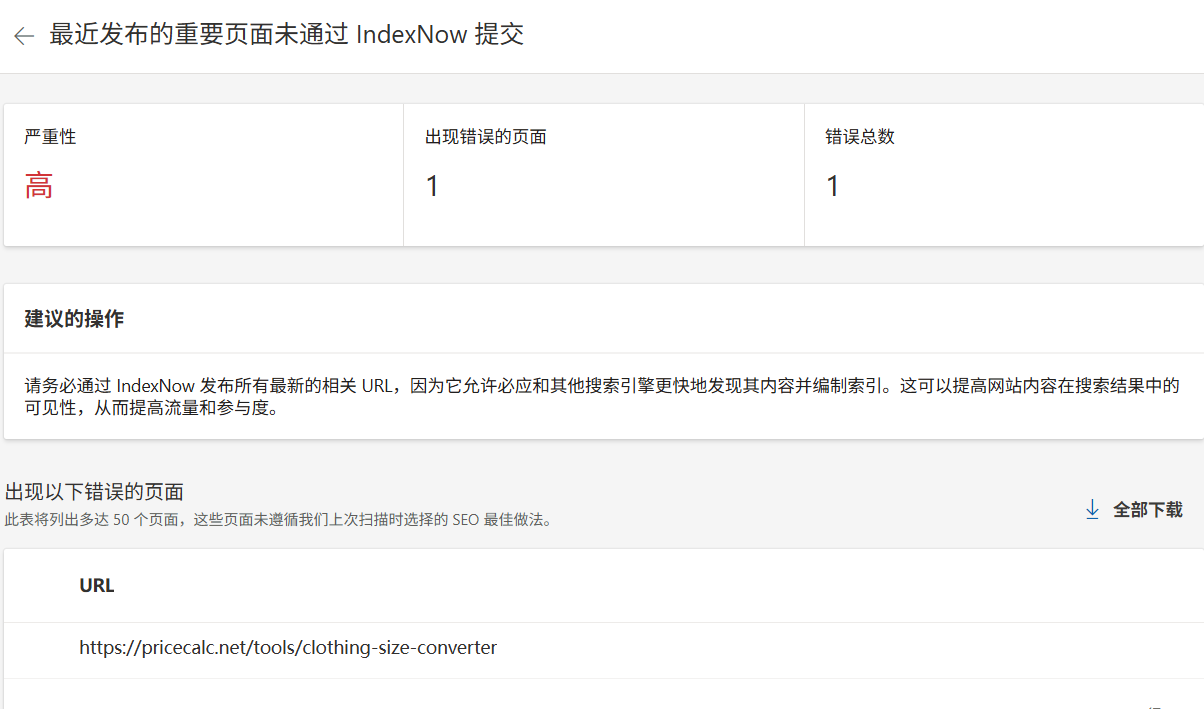
然后我真正需要推送到新页面,反而没有被正确推送,必应经常提示我 最近发布重要的页面未通过 IndexNow 提交。说实话真有点红温了,猪队友了说是。我小手一点就给这个功能关闭了,决定编写脚本通过API进行推送。
关闭Crawler Hints
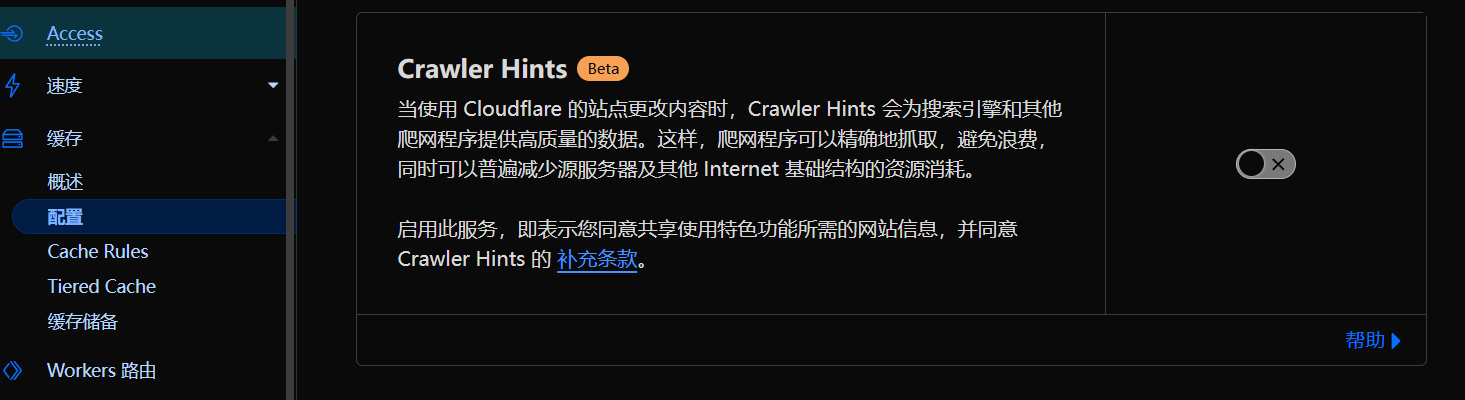
造成这个现象的原因我问了AI,大概说是静态网站不是hash模式的问题,总之我们先登录Cloudflare控制台,进入域名-缓存-配置,关闭Crawler Hints按钮。当然如果你的网站类型不是静态的,也许只需要开启这个功能就可以了。
通过api推送
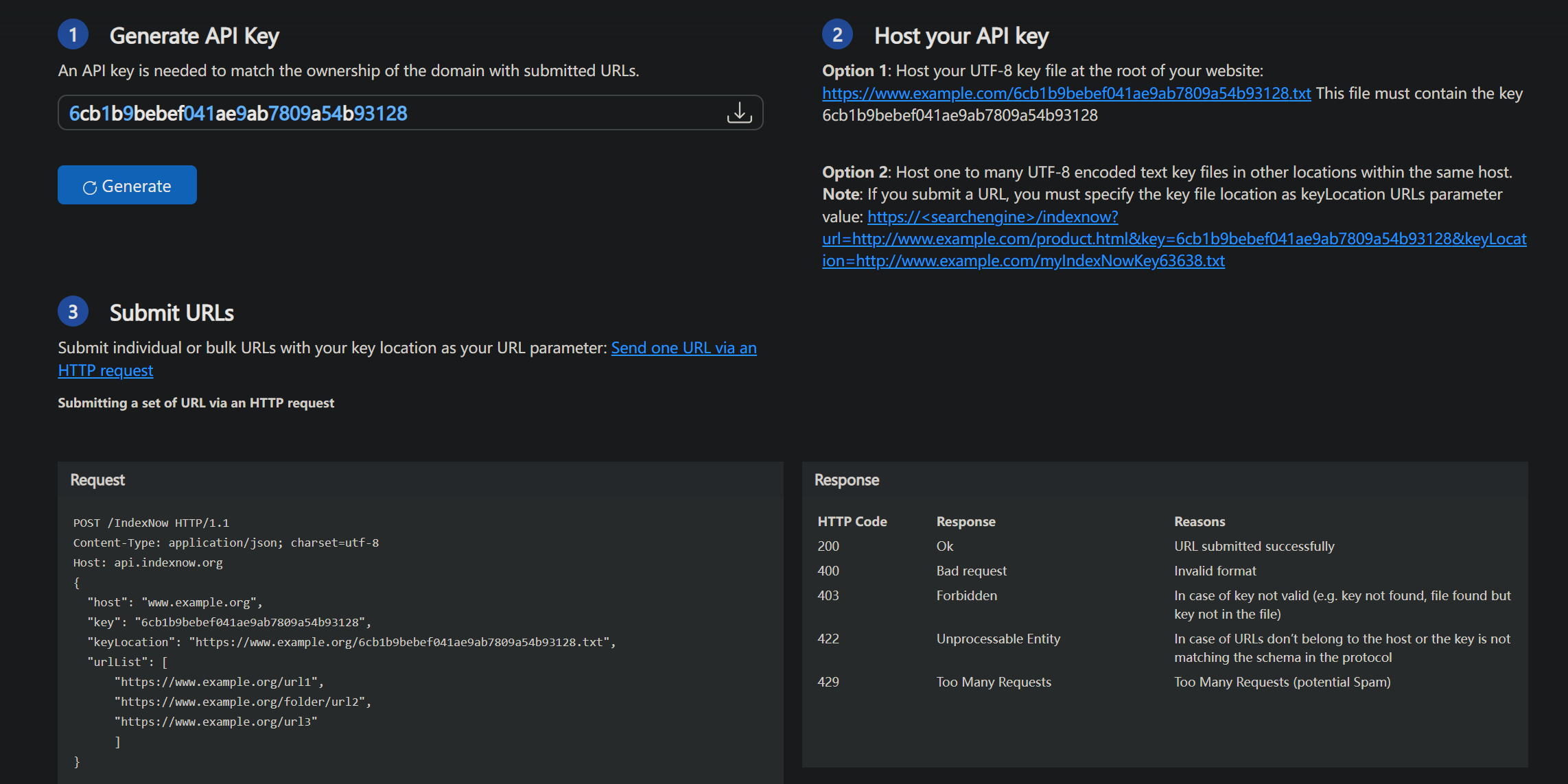
好在IndexNow提供了API可以手动推送,教程地址如下 Bing IndexNow Started 方式非常简单,只需要通过POST请求将URL批量发送给必应即可。
配置api key
打开网页后,会随机生成一个密钥,绑定密钥到域名的方式很简单,点击下载这个密钥文件,放在网站的根目录下,最终实现可以通过域名+密钥访问这个文件。比如:https://example.com/6cb1b9bebef041ae9ab7809a54b93128.txt
这里最好直接下载文件,不要手动输入,可能会造成格式问题。直接下载后放到public或者static等静态目录下,然后上传到线上,确保可以通过链接访问到这个文件,并且文件内容就是这个密钥。
编写js脚本
我这里的思路是对比线上已有的sitemap.xml文件,然后对比新构建后的sitemap.xml文件,找出新增的页面,通过api推送给必应。
新建一个scripts/pushIndexNow.js,注意必须要填写站点域名和密钥。
#!/usr/bin/env node
/**
 * pushIndexNow.js - Auto push new pages to Bing IndexNow
 * Usage:
 *   Local dry-run (check new URLs):
 *     node pushIndexNow.js --check
 *   Actual push online:
 *     node pushIndexNow.js --push
 *
 * Note: This script is intended to run in Node.js (server-side), not in the browser.
 */

import fs from 'fs';
import path from 'path';
import process from 'process';

// ====== Configuration ======
const SITE_URL = 'https://pricecalc.net';         // Your website URL
const INDEXNOW_KEY = '87be74cabfba46a4a30454dc488dd285';           // Your IndexNow Key
const NEW_SITEMAP_FILE = path.join(process.cwd(), 'out', 'sitemap.xml');  // Local sitemap
const OLD_SITEMAP_URL = `${SITE_URL}/sitemap.xml`;  // Online sitemap URL
const CHUNK_SIZE = 1000;                             // Max URLs per push

// ====== Command-line args ======
const args = process.argv.slice(2);
const PUSH_MODE = args.includes('--push');
const CHECK_MODE = args.includes('--check') || !PUSH_MODE;

// ====== Helper functions ======
function chunkArray(arr, size) {
  const out = [];
  for (let i = 0; i < arr.length; i += size) out.push(arr.slice(i, i + size));
  return out;
}

// Parse sitemap.xml using regex to extract <loc> URLs
function parseSitemap(xmlString) {
  const regex = /<loc>(.*?)<\/loc>/g;
  const urls = [];
  let match;
  while ((match = regex.exec(xmlString)) !== null) {
    urls.push(match[1]);
  }
  return urls;
}

// Send URLs to Bing IndexNow
async function sendIndexNow(urls) {
  const payload = {
    host: new URL(SITE_URL).hostname,
    key: INDEXNOW_KEY,
    keyLocation: `${SITE_URL}/${INDEXNOW_KEY}.txt`,
    urlList: urls
  };

  console.log('=== IndexNow POST Payload Preview ===');
  console.log(JSON.stringify(payload, null, 2));
  console.log('====================================');

  const res = await fetch('https://api.indexnow.org/indexnow', {
    method: 'POST',
    headers: { 'Content-Type': 'application/json; charset=utf-8' },
    body: JSON.stringify(payload)
  });
  const text = await res.text();
  return { ok: res.ok, status: res.status, text };
}

// ====== Main ======
(async function main() {
  // 1. Read local sitemap.xml
  if (!fs.existsSync(NEW_SITEMAP_FILE)) {
    console.error('Local sitemap.xml not found:', NEW_SITEMAP_FILE);
    process.exit(1);
  }
  const xml = fs.readFileSync(NEW_SITEMAP_FILE, 'utf-8');
  const newUrls = parseSitemap(xml);

  // 2. Fetch online sitemap.xml
  let oldUrls = [];
  try {
    const res = await fetch(OLD_SITEMAP_URL);
    if (res.ok) {
      const oldXml = await res.text();
      oldUrls = parseSitemap(oldXml);
    } else {
      console.warn('Online sitemap.xml not found (HTTP', res.status, '). Assuming all URLs are new.');
    }
  } catch (e) {
    console.warn('Error fetching online sitemap.xml. Assuming all URLs are new.', e.message);
  }

  // 3. Compute difference (new URLs)
  const oldSet = new Set(oldUrls);
  const toPush = newUrls.filter(u => !oldSet.has(u));

  if (toPush.length === 0) {
    console.log('No new pages to push.');
    process.exit(0);
  }

  console.log(`Found ${toPush.length} new pages.`);

  if (CHECK_MODE) {
    console.log('== Dry run mode ==');
    toPush.forEach(u => console.log(u));
    process.exit(0);
  }

  // 4. Push new URLs to Bing IndexNow
  const chunks = chunkArray(toPush, CHUNK_SIZE);
  for (let i = 0; i < chunks.length; i++) {
    const chunk = chunks[i];
    console.log(`Pushing chunk ${i + 1}/${chunks.length} (${chunk.length} URLs)...`);
    try {
      const res = await sendIndexNow(chunk);
      if (res.ok) console.log(`Chunk ${i + 1} succeeded (HTTP ${res.status})`);
      else console.error(`Chunk ${i + 1} failed (HTTP ${res.status})`, res.text);
    } catch (e) {
      console.error(`Chunk ${i + 1} encountered an error:`, e.message || e);
    }
    if (i < chunks.length - 1) await new Promise(r => setTimeout(r, 500));
  }

  console.log('IndexNow push completed.');
})();
修改build脚本
加上最后一步node scripts/pushIndexNow.js,注意这里我添加了npm run build-dev命令,因为本地运行时就会直接触发推送了,我们要实现的效果是在构建时触发,我这里就新加了一个本地运行的命令
# before build command
"build": "next build && next-sitemap",

# after build command
"build": "next build && next-sitemap && node scripts/pushIndexNow.js --push"

"build-dev": "next build && next-sitemap && node scripts/pushIndexNow.js --check"
本地测试
这段代码可以本地测试运行,附带--check参数进行预检测
node scripts/pushIndexNow.js --check
注意最好直接运行npm run build-dev进行测试,因为本质上是读取sitemap.xml文件,如果你修改了代码但是没有构建,sitemap是不会更新的
npm run build-dev

#output:
Found 1 new pages.
== Dry run mode ==
https://example.com/new-page/
检测是否生效
添加新页面后,可以直接手动执行--push,会打印日志,包括post请求具体参数,会返回的响应结果,200就是直接成功,202只能代表命令执行成功了,至于400和403就是参数和权限错误。
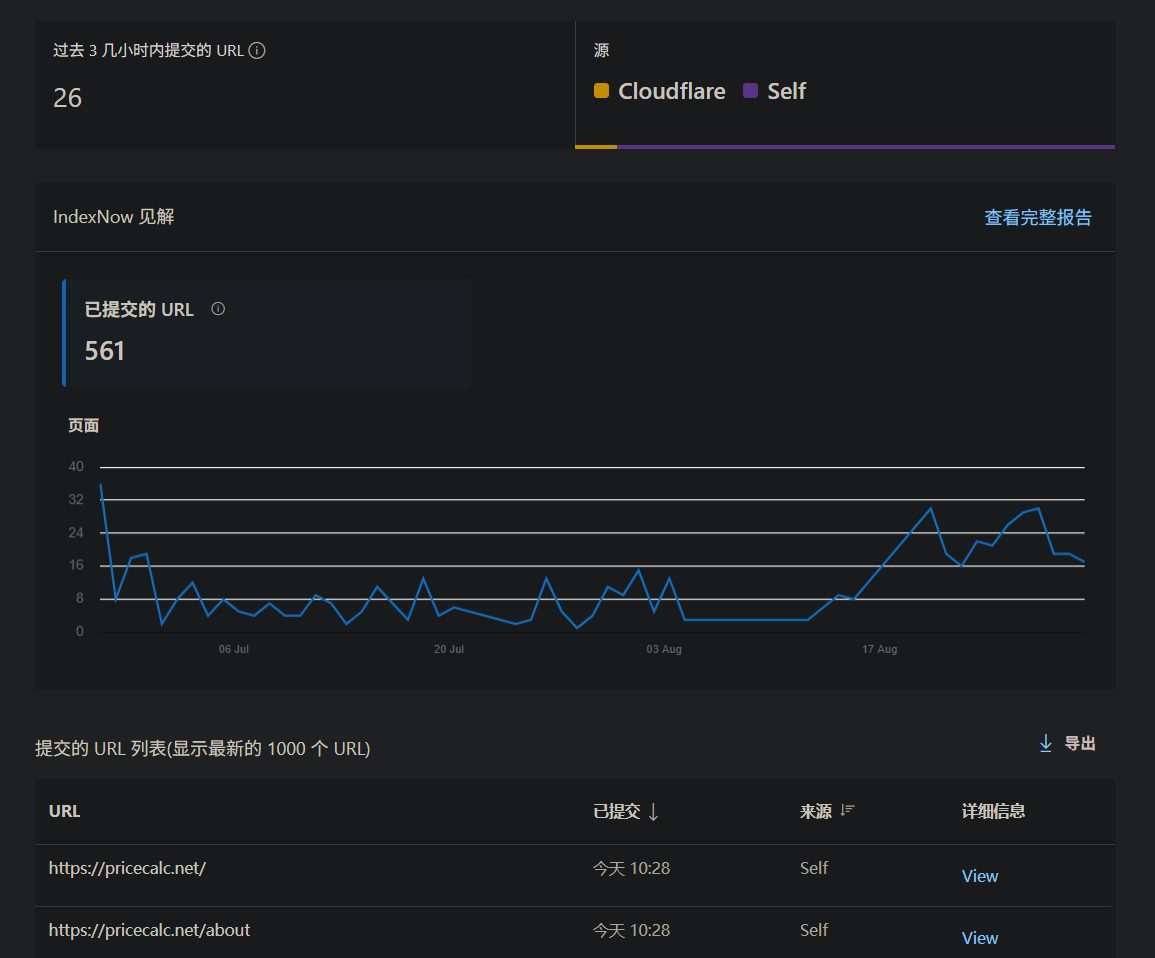
然后去Bing IndexNow控制台,检查最近推送的URL,推送成功的话就会显示你推送的链接,和推送方式,API推送会显示self,到此就大功告成了~
代码开源
最后我把代码放在了GitHub上,欢迎大家 Star 谢谢~